

Tools, instructions, and regulations
Here you’ll find the tools, instructions, and regulations you need for your studies.
Essential tools
In this section you can explore both the core tools used by students and other useful tools for studying (such as Goreact used by interpreters, the Virpi video tool and Turnitin — the text originality tool).
Humak uses the Peppi student information system. Through Peppi, you will manage important practical matters during your studies, such as enrolling on course implementations and completing the statutory registration for academic year.
Log in to Peppi with your Humak credentials via HAKA login.
Teams is a collaboration platform included in the Microsoft 365 package, enabling team communication, video meetings, and file storage and editing. You can use Teams via a browser, install the desktop version on your computer, or download the mobile app on your phone. You will find login instructions, user guides, tips, and Humak’s Teams communication guidelines on the Microsoft Teams page. Teams is part of the Microsoft 365 service package, which you have access to for the duration of your valid study entitlement. Please note that your credentials and all material saved to your account will be deleted within 30 days of your study entitlement ending.
Logging in:
- Go to https://portal.office.com.
- Log in with your Humak credentials in the format username@humak.fi.
- Enter your password.
- Access your desired application by clicking the grid icon in the bottom left corner labelled Apps.
In Lukkarikone you can view your own timetable and build new ones. Lukkarikone is a separate view that shows the bookings made for your studies. Log in to Lukkarikone with your Humak credentials, or search for information without logging in.
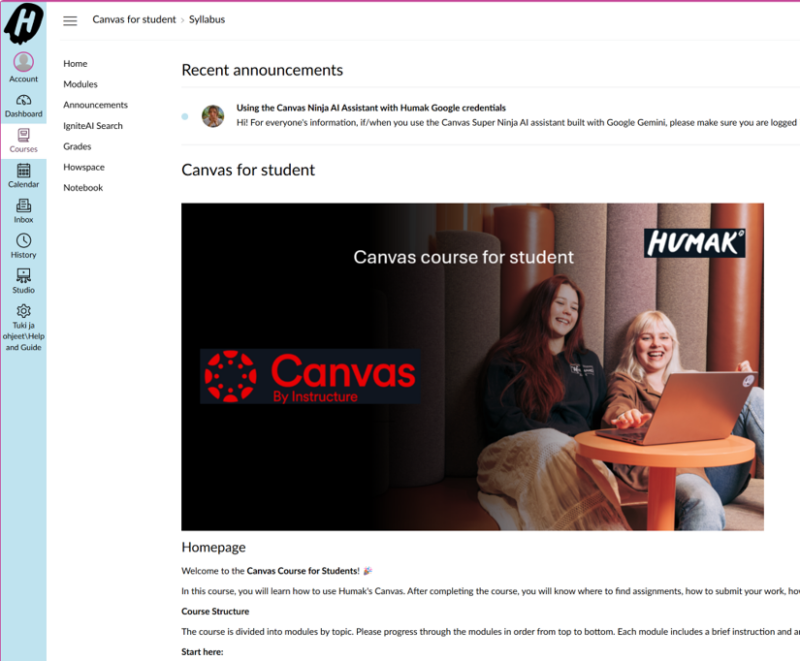
Canvas is Humak’s online learning platform, where you will find course completion instructions, assignments, and submission areas. Course-related communication also takes place in Canvas. Please note that courses become visible in Canvas when they begin.
You can find more instructions on how to use Canvas and its different features on the Canvas for student course. To access the course, log in to Canvas, go to the Dashboard and select the Canvas for students course.
Zoom is one of Humak’s online teaching spaces, also used for guidance and coaching meetings. You can test the application on the test platform before your actual teaching or guidance session.
If you wish to install Humak’s version of the Zoom application on your computer, contact IT support at support@humak.fi. You can access Zoom with your Humak credentials. You can also log in to Zoom via Humak’s website through the tool symbol menu under HumakZoom.
On the RPL page you will find instructions for the recognition of prior learning and for using the eRPL tool in Peppi.
Tuudo is a mobile application that brings together information and services useful to students. Tuudo retrieves information from study information systems (e.g. Peppi) and other services and brings it directly to your mobile device in real time.
In Tuudo you will find, among other things,
- Digital student card (student discounts for degree students)
- Study information (class schedule, course achievements, registrations)
- Internship places / job opportunities
- Library card
- Quick links to Humak student services
- Information about the student union HUMAKO
Tuudo can also be used at Humak by non-degree students, such as students at the Open University of Applied Sciences.
Where can I get Tuudo and how do I log in?
Tuudo works on Android, HarmonyOS and iOS devices. You can download Tuudo for free from the Apple App Store or Google Play. Select Humak UAS from the options. The first time you use Tuudo, log in with your Humak ID (without the @humak.fi part) and password. The ID is the same short username (e.g. in the form sukuet01) that you use to log in to Peppi, for example. Logging in is usually not required the following times.
Questions about Tuudo?
You can send feedback or questions directly to the Tuudo developers via the Contact us function in the application. You can also contact Tuudo by email: info@caleidon.fi
Humak’s library electronic and print collections can be searched in Humak’s online library.
Humak students — including Open UAS students — with a valid study entitlement have access to a Humak Outlook mailbox and Microsoft Office 365 services. Please note that credentials will be removed and all data saved to the account will be deleted within 30 days of your study entitlement ending. Find out more about Microsoft 365 instructions here.
- Go to https://portal.office.com and log in using your Humak credentials in the format username@humak.fi. In the next window that opens, enter your password.
- Click the waffle menu in the top left corner of the Microsoft 365 service and find the application you need.
Wihi is the platform through which all thesis-related communication between the student, thesis supervisor, and commissioner takes place. The thesis topic proposal, thesis plan, thesis collaboration agreement, and the various submission stages of the thesis are all processed in Wihi, where the thesis is also assessed in due course.
Thesis credits are recorded directly in the PSP through Wihi. The thesis process is divided into three stages in Wihi (1/3, 2/3 and 3/3).
Wihi support requests: peppi@humak.fi
AtomiSign is a platform for signing various agreements (e.g. the internship agreement).
Log in to AtomiSign using Microsoft authentication.
Other tools
BreakPro is an exercise break app that reminds you to take breaks during work and study.
Google Workspace is a suite of services that includes tools for facilitating learning and enhancing community and collaboration. Humak students — including Open UAS pathway and Access Route students — with a valid study entitlement have access to Google Workspace services. Please note that Gmail and Google Calendar are not included; these are used via the Office 365 service instead.
GoReact is a cloud-based video management system. GoReact is used at Humak particularly on interpreting courses.
Padlet is a digital notice board for, for example, group work.
Instructions and tips
Please note: the calendar’s user interface is in Finnish. The Finnish names of buttons and functions are given below, with English translations in parentheses.
- Calendar views: You have three different views available: wheel, list, and calendar. The default view is the wheel.
- Filter function:
- Filter for a clearer view using the eye icon by activities (aktiviteetit). Note that you can vary the view in many different ways.
- Use the Näytä: Kaikki | Ei (Show: All | None) function to hide or show all information at once.
- Example: If you only want to see library service training sessions, hide all other activities except those related to library training. This way you’ll see only the events that interest you, gathered in one place.
- Search function: You can search the calendar’s content using the standard search function.
- More information about an event:
- Hover your cursor over an individual event to see more detailed information appear in the center of the wheel.
- Click on an individual event to open detailed information on the right side of the screen, along with any links attached to that event.
- Managing the view:
- Click Näytä agenda (Show agenda) on the outer edge of the wheel for the desired month. This displays that month’s events in a list view.
- Navigate the calendar using the arrow keys. A single arrow moves forward or backward one month at a time, while a double arrow moves one year at a time. The circular arrow returns to the current date.
- Zoom and full-screen mode:
- Zoom in: Hold down the Alt key and click the plus icon.
- Zoom out: Hold down the Alt key and click the minus icon (returns to 100% view).
- Access full-screen mode via the icon with four arrows pointing to the corners.
Thinglink is an application that enables the creation of interactive images, videos and 360 media.
- Go to www.thinglink.com and click “Sign in”.
- Click the Microsoft logo and log in using your Humak credentials in the format shortname(at)humak.fi.
Draft Coach is designed to check the originality of texts and citations while you are writing your own text. Draft Coach provides a Turnitin “originality report” that shows similarities with texts in Turnitin’s databases. In addition, the writer receives guidance on writing their own text. Draft Coach is available to both staff and students using Humak’s Microsoft credentials.
Draft Coach works in Word Online and appears in the top menu as “Turnitin”. Select the Turnitin tab and then Draft Coach, whereupon the Turnitin Draft Coach add-in will appear on the right-hand side of the document.
Watch the video for an overview of how Draft Coach works.
Turnitin is an anti-plagiarism web service that helps check whether theses contain, for example, passages copied from the internet. Turnitin can also be used to verify the accuracy of source references.
Virpi is a video tool for the thesis process.
Webropol is an online survey and reporting tool used for creating surveys, collecting responses and analysing data.
You will find Webropol user guides after logging in under “Support and instructions” in the top toolbar.
Jobiili is a practice placement reservation tool for social and health care students at Universities of Applied Sciences. Humak students in the Community Educator degree programme, and in the future also in the Interpreter degree programme can apply for internship placements through the Jobiili platform.
Log in to Jobiili using your Haka login: https://www.jobiili.fi/
Instructions
Here you’ll find the instructions and guides you’ll need throughout your studies.
A small writing guide
Citation guide
Thesis guide (BA)
Thesis guide (MA)
Communication services
Here you will find Humak’s PowerPoint template.
Download the template for written assignments
Note: if you edit new templates in Word’s browser version or Teams, the templates will not function correctly. In order to see elements in Humak’s Word templates, you need to view the document in the “view” mode instead of “edit” mode, or manually navigate to the top and bottom headers from the “view” tab.
Information search guidance
Regulations and principles
Humak’s regulations and principles shape everyday student life and help build a safe and inclusive community. Read about the regulations and principles that apply to you as a student.

The degree regulations are an official document of a higher education institution that defines the general rules, rights and obligations for studying and completing degrees. The degree regulations clarify the principles and key instructions regarding studies and teaching.
Our guidelines are based on our values and guide all members of our university community to act responsibly and respectfully in everything related to studying, work, and cooperation — both within the university of applied sciences and in our relationships with clients and partners.
Ethics Committee is responsible for ethics-related issues
A designated ethics committee has been appointed at Humak. Its purpose is to promote ethical debate, monitor the implementation of ethical principles, and develop ethics in the University of Applied Sciences. The committee meets whenever necessary.
The responsibilities of the ethics committee include:
- discussing and making recommendations on ethical issues related to studying, teaching and research, and development activities
- developing and renewing ethical principles and guidelines for studying, teaching and research and development activities
- providing information on the above matters.
The ethics committee can be contacted at: eettinentoimikunta@humak.fi.
Ethical issues related to research and development activities
- Humak is committed to the Finnish National Board of Research Intergrity TENK’s guidelines on good scientific practice (2012): Responsible conduct of research and procedures for handling allegations of misconduct in Finland.
- Humak follows the ethical recommendations for theses approved by Arene.
- Humak is a member organization of The Human Sciences Ethics Committee of the Helsinki Region Universities of Applied Sciences.
- Humak uses a plagiarism checker (Urkund).
- Humak’s methodological teaching and thesis manuals are part of the Bachelor’s and Master’s degree programs and cover research ethics.
- As part of Humak’s research ethics activities, an electronic, publicly available Humak citation guide has been published and is used in Humak’s Bachelor’s and Master’s degree studies and in Humak’s own publishing activities.
- Our teachers are familiar with the Responsible Research website and present it to students.
Accessibility is the realization of a physical, mental, and social environment in such a way that everyone, regardless of their characteristics, can function on an equal footing with others. The learning environment – including the digital environment – must take into account individual support needs related to learning disabilities, health conditions, or cultural and linguistic background, so that learning can progress according to the objectives. Particular attention should be paid to the overall accessibility and accessibility of guidance, teaching and learning.
The terms accessibility and usability are used to assess the accessibility of different online services. They promote diversity and equality. The Accessibility Directive entered into force in the EU on December 22 2016. Its key objective is to ensure that every individual has the full potential to function fully in digital environments. Learning can be supported by smart technologies, such as apps that can transform speech into text or text into speech, for example. In online environments, accessibility takes the form, for example, of multimodal solutions using different sensory channels.
How is accessibility taken into account at Humak?
As a student, you often know best what kind of facilities you personally need. If you have a learning disability, a health condition that affects your studies, or individual support needs related to your cultural and linguistic background, you should contact a study counsellor right at the very beginning of your studies. After discussion with the study counsellor, any individual arrangements to help you with your studies (e.g. extra time for exams, returning assignments, or alternative ways of completing them) will be agreed upon.
Submit any certificates and statements related to the arrangements to your counselor. The mutually agreed arrangements will be recorded in Peppi’s contract archive and your student counselor and your PSP coach will be added as parties to the contract. In this way, the arrangements agreed in the contract can be taken into account on an implementation-specific basis in the coaching. You can discuss in more detail with the lecturer responsible for the implementation what the arrangements mean in a specific course implementation.
We are a university of applied sciences seeking to build a more humane world. Our task is to unite people and strengthen humanity, civil rights and a sense of community. Our activities are based on the promotion of equality and accessibility in all teaching, research and everyday encounters. We want to create an environment where everyone has genuine and equal opportunities to learn, develop, participate and influence. This work is guided by our jointly prepared equality, equality and accessibility plan. Read the plan below.
At Humak, teaching follows the principles of a safer space, developed on the basis of UN Association principles. A safer space is an environment where everyone actively contributes to building an equal, respectful and open atmosphere. The safer space principles apply to the entire learning community — students, teachers and other staff — and everyone is expected to commit to them.
The ability to use AI is an important skill in many professions – even more so in the future. Using AI tools can also enhance and deepen learning. Humak encourages its students to take up different AI tools and exploit the potential of AI already during their studies.
AI can be used for all learning tasks unless specifically prohibited. The use of AI must be expressed transparently: What AI tools have been used and how? Students are responsible for the content of the learning tasks they carry out. See the Student Guide for the software and systems available for Humak students.
For example, you can ask AI for comments on learning tasks. AI may also suggest useful innovative, creative, and inclusive ways to produce learning task content. It can help to create images and diagrams, as well as presentations and summaries of the given topics. In building the knowledge base, AI may suggest relevant sources. AI can also help with spell-checking, synthesizing, and structuring tasks.
AI is a useful tool but does not replace the importance of personal thinking and decision-making. AI may provide incorrect information or biased interpretations, especially if the user gives it poor-quality prompts. Humak recommends that learning tasks do not include direct quotes from AI-generated text. However, if this is done, the reference will be marked according to Humak’s reference guide. In addition, students should familiarize themselves
with the terms of use of the AI tools they use.
For more information, see the guide-specific AI instructions:
In June 2023, the Rectors’ Conference of Finnish Universities of Applied Sciences Arene published its recommendations on the use of artificial intelligence for universities of applied sciences. Humak’s guidelines follow Arene’s recommendations.